From a Folder Picker to a tmux Workspace Switcher
Evolving a Bash and fzf folder picker into a tmux workspace switcher that discovers Git worktrees and reuses existing sessions. A small tmux sessionizer can make moving between projects almost effortless: choose a directory with That was enough until Git worktrees entered the picture. A project was no longer just one directory. It could have a main checkout, several feature branches in separate worktrees, and existing tmux sessions running agents or development servers. The question changed from “Which folder do I want?” to “Which workspace do I want to return to?” Here is how I evolved a simple folder picker into a workspace switcher—without turning it into another project-management tool. The finished workflow starts with prefix, then A popup lists two kinds of entries: Session entries point to something already running. Folder entries are places where a session can be reused or created. Inside the picker: The filters preserve the search query. The popup closes after a successful selection, leaving the chosen session visible. Recursively searching an entire home directory is rarely a useful project picker. It quickly fills with dependency folders, build output, and repositories’ internal directories. Instead, the script starts with a few explicit search roots: It lists their immediate subdirectories and skips missing roots quietly. Two additions make that shallow search useful with worktrees: Existing tmux sessions are listed independently of folder discovery, so they remain reachable even when their directories are somewhere else. This is deliberately not an exhaustive filesystem index. For example, a repository at The original script used a directory’s basename as the tmux session name. That is convenient until two repositories have the same name: Looking up the session named The revised script first resolves the selected directory to a physical, absolute path, then compares it with each session’s New sessions still get readable names. If the basename is already taken, the script adds a checksum-derived suffix, with a numeric fallback for further collisions. The checksum helps generate a name; it is not the identity check. When choosing an existing session directly, the picker uses tmux’s session ID, such as There is one important boundary: Each picker row contains four tab-separated fields: For a session, the target is its tmux ID. For a directory, it is the full path. The session-only shortcut changes the input rather than inserting a magic search term. Save this as This implementation uses Bash, Git, tmux, Make it executable: It can also be invoked directly, inside or outside tmux: Outside tmux it attaches to the selected session; inside tmux it switches the client. The first popup binding launched the script with a client format embedded directly in its command: The popup immediately disappeared. The script’s selection logic had passed tests, but those tests had not exercised this launch path. In the tested tmux version, the popup command did not expand that format. Passed to the shell unquoted, the literal The fix was to expand the format in There are a few deliberate choices here: Reload the configuration: No server restart is necessary. One diagnostic limitation remains: the script currently treats an unsuccessful picker pipeline as cancellation. That means Workmux and the sessionizer have different jobs: For a session-per-worktree workflow, Workmux supports this global setting: With a shell alias such as Selecting a Likewise, deleting worktrees or cleaning up branches after a pull request merge remains a Workmux or Git operation—not something this picker does. A syntax check is useful: But the immediately closing popup demonstrated why it is not enough. The checks for this workflow covered: The interactive checks ran in a separate tmux server under a pseudo-terminal. That exercised the real keybinding and popup without touching the working sessions. There are still sensible limits for a personal script: the picker’s tab-separated, line-oriented records assume names do not contain tabs or newlines; directory-based reuse is based on The useful improvements were not elaborate previews or more status information. They were about making navigation predictable: The result is still a small Bash script, but it now answers the question that matters during a working day: where do I want to continue?fzf, then create or attach to a session for it.What the picker does
f. My prefix is Ctrl+A; substitute yours if it is different.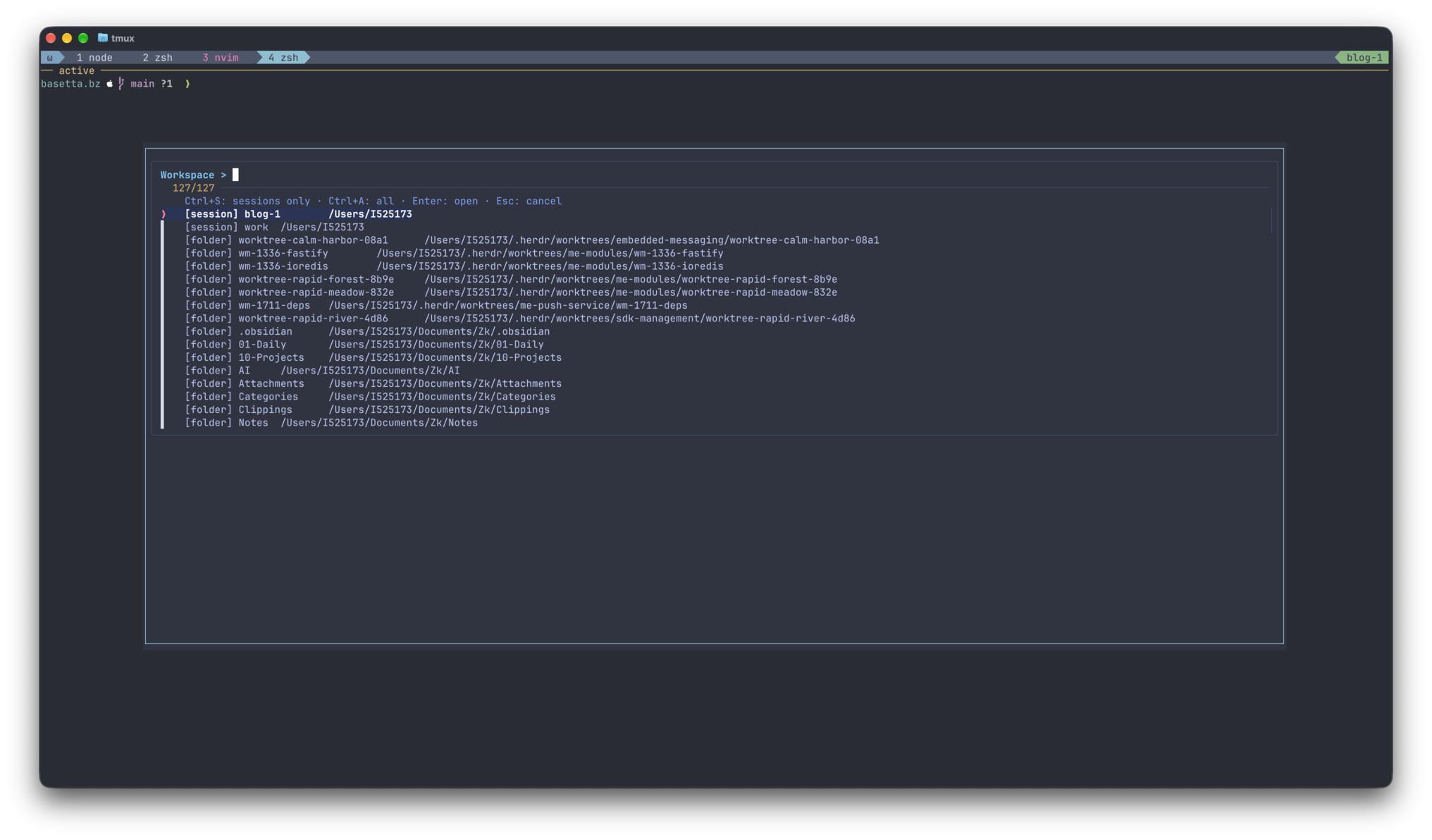
[session] feature-login    /home/me/projects/web-app__worktrees/feature-login
[session] docs             /home/me/notes
[folder] web-app           /home/me/projects/web-app
[folder] feature-login /home/me/projects/web-app__worktrees/feature-loginKey Action Type Fuzzy-search the entries Ctrl+SShow existing sessions only Ctrl+AShow sessions and folders again EnterOpen the selected workspace EscCancel Discover workspaces, not every directory
"$HOME/projects"
"$HOME/work/repos"
"$HOME/notes"<repo>__worktrees. The picker lists that container’s immediate children instead of treating the container as a project.git worktree list --porcelain -z. This also finds worktrees stored outside the configured search roots.~/projects/team/web-app needs ~/projects/team added as a search root if it is not otherwise discoverable.A session name is a label, not an identity
~/projects/api
~/work/repos/apiapi cannot tell those directories apart.session_path. It only creates a session if no match exists.$3, rather than trying to reconstruct a target from its display name.session_path is the session’s recorded starting directory, not the current directory of every pane inside it. If another tool starts sessions from a generic directory, choose their explicit [session] entries rather than expecting directory-based matching to identify them.Keep display text separate from selection data
kind target display-label display-pathfzf --with-nth=3.. shows only the friendly label and path, while the original row remains available when an entry is selected. This avoids parsing a path back out of a decorated label.Ctrl+S reloads the script in a data-only mode; Ctrl+A reloads all entries. Neither data-only mode creates or attaches to a session.The complete script
~/.config/scripts/tmux-sessionizer and adjust the search roots to match your own directory layout.fzf, and standard utilities including find, sort, cksum, and awk. The popup binding below was tested with tmux 3.8 and fzf 0.74.4 on macOS; check compatibility before using it with older versions.#!/usr/bin/env bash
# Project/worktree picker. Also accepts a directory directly.
set -euo pipefail
client=''
if [[ ${1:-} == --client ]]; then
client=${2:?Missing tmux client}
shift 2
fi
if (( $# > 1 )); then
printf 'Usage: %s [--client CLIENT] [DIRECTORY]\n' "$0" >&2
exit 1
fi
canonical_path() {
(cd -- "$1" 2>/dev/null && pwd -P)
}
session_rows() {
tmux list-sessions -F $'#{session_id}\t#{session_name}\t#{session_path}' 2>/dev/null || true
}
find_session() {
local wanted=$1 id name path resolved
while IFS=$'\t' read -r id name path; do
[[ -n "$id" ]] || continue
resolved=$(canonical_path "$path") || continue
if [[ "$resolved" == "$wanted" ]]; then
printf '%s\n' "$id"
return
fi
done < <(session_rows)
}
project_directories() {
local root directory record
for root in "$HOME/projects" "$HOME/work/repos" "$HOME/notes"; do
[[ -d "$root" ]] || continue
while IFS= read -r -d '' directory; do
if [[ "$directory" == *__worktrees ]]; then
find "$directory" -mindepth 1 -maxdepth 1 -type d -print0
continue
fi
printf '%s\0' "$directory"
while IFS= read -r -d '' record; do
if [[ "$record" == 'worktree '* ]]; then
printf '%s\0' "${record#worktree }"
fi
done < <(git -C "$directory" worktree list --porcelain -z 2>/dev/null || true)
done < <(find "$root" -mindepth 1 -maxdepth 1 -type d -print0)
done
}
session_picker_rows() {
local id name path
while IFS=$'\t' read -r id name path; do
[[ -n "$id" ]] || continue
printf 'session\t%s\t[session] %s\t%s\n' "$id" "$name" "$path"
done < <(session_rows)
}
picker_rows() {
local directory
session_picker_rows
while IFS= read -r directory; do
printf 'directory\t%s\t[folder] %s\t%s\n' "$directory" "${directory##*/}" "$directory"
done < <(
while IFS= read -r -d '' directory; do
canonical_path "$directory" || true
done < <(project_directories) | LC_ALL=C sort -u
)
}
# Data-only commands for fzf reloads.
case ${1:-} in
--list-sessions) session_picker_rows; exit 0 ;;
--list-all) picker_rows; exit 0 ;;
esac
if (( $# == 1 )); then
selected=$1
target=''
else
reload_command=$(printf '%q' "$0")
choice=$(picker_rows | fzf --delimiter=$'\t' --with-nth=3.. \
--layout=reverse --border --no-preview --prompt='Workspace > ' \
--bind="ctrl-s:reload($reload_command --list-sessions)+change-prompt(Sessions > )" \
--bind="ctrl-a:reload($reload_command --list-all)+change-prompt(Workspace > )" \
--header='Ctrl+S: sessions only · Ctrl+A: all · Enter: open · Esc: cancel') || exit 0
[[ -n "$choice" ]] || exit 0
IFS=$'\t' read -r kind selected label path <<< "$choice"
target=''
if [[ "$kind" == session ]]; then
target=$selected
fi
fi
if [[ -z "$target" ]]; then
selected=$(canonical_path "$selected") || {
printf 'Directory does not exist.\n' >&2
exit 1
}
target=$(find_session "$selected")
if [[ -z "$target" ]]; then
base=$(basename -- "$selected" | tr '.:' '__')
[[ -n "$base" && "$base" != / ]] || base=workspace
name=$base
suffix=$(printf '%s' "$selected" | cksum | awk '{print $1}')
n=0
while tmux has-session -t "=$name" 2>/dev/null; do
name="${base}-${suffix}"
if (( n > 0 )); then name="${name}-${n}"; fi
n=$((n + 1))
done
target=$(tmux new-session -d -P -F '#{session_id}' -s "$name" -c "$selected")
fi
fi
if [[ -n "$client" ]]; then
tmux switch-client -c "$client" -t "$target"
elif [[ -n ${TMUX:-} ]]; then
tmux switch-client -t "$target"
else
tmux attach-session -t "$target"
fichmod +x ~/.config/scripts/tmux-sessionizer~/.config/scripts/tmux-sessionizer "$HOME/projects/web-app"The popup bug that the first tests missed
# This did not work in the tested tmux version.
bind-key f display-popup -E '~/.config/scripts/tmux-sessionizer --client #{q:client_name}'# began a comment, leaving --client without its required argument.run-shell first, then pass the resolved client explicitly to both the popup and the script:# ~/.config/tmux/tmux.conf
# Keep this binding on one line.
bind-key f run-shell -b 'tmux display-popup -c #{q:client_name} -w 85% -h 70% -s "bg=#2e3440,fg=#d8dee9" -S "bg=#2e3440,fg=#89c0d0" -EE "$HOME/.config/scripts/tmux-sessionizer" --client #{q:client_name}'-EE: the popup closes on success but remains visible if its command exits unsuccessfully.tmux source-file ~/.config/tmux/tmux.conf-EE cannot expose every fzf failure. For a more hardened version, distinguish expected cancellation from unexpected picker errors instead of mapping all of them to a successful exit.Where Workmux fits
# ~/.config/workmux/config.yaml
mode: sessionwm=workmux, wm add feature-login can create a worktree and its session. The sessionizer can then find that session alongside unrelated projects.[folder] entry does not invoke workmux add or start a configured agent layout. If there is no matching session, it creates a plain tmux session in that directory. That separation is intentional: the picker should not quietly perform worktree lifecycle operations.Test the interaction, not just the script
bash -n ~/.config/scripts/tmux-sessionizerfzf.session_path; and discovery intentionally stays shallow. Making those boundaries explicit is better than claiming it finds every possible workspace.Keep the switcher small