I am moving from tmux to Rex. My fingers were not consulted.
They still press Ctrl + A, then F, and expect a list of project folders. Apparently, terminal migration requires their approval.
In tmux, that sequence opened an fzf popup. I picked a project or Git worktree. The script reused its session or created a new one, then switched to it. I was so pleased with how it turned out that I wrote about it. Shortly afterwards, I switched terminal multiplexers.
Nothing fancy. Just one of those small conveniences that becomes a requirement the moment it disappears.
I wanted the same thing in Rex:
Ctrl+A, F → choose folder → open its Rex sessionRex already has a session picker under Cmd+K. Great. Except it lists sessions, and I wanted folders.
Those are related, but not interchangeable. A repository does not become a session just because I look at it with sufficient optimism.
So I built a project picker. The finished version is pleasantly small. Getting there involved more terminal configuration than choosing a folder should reasonably require.
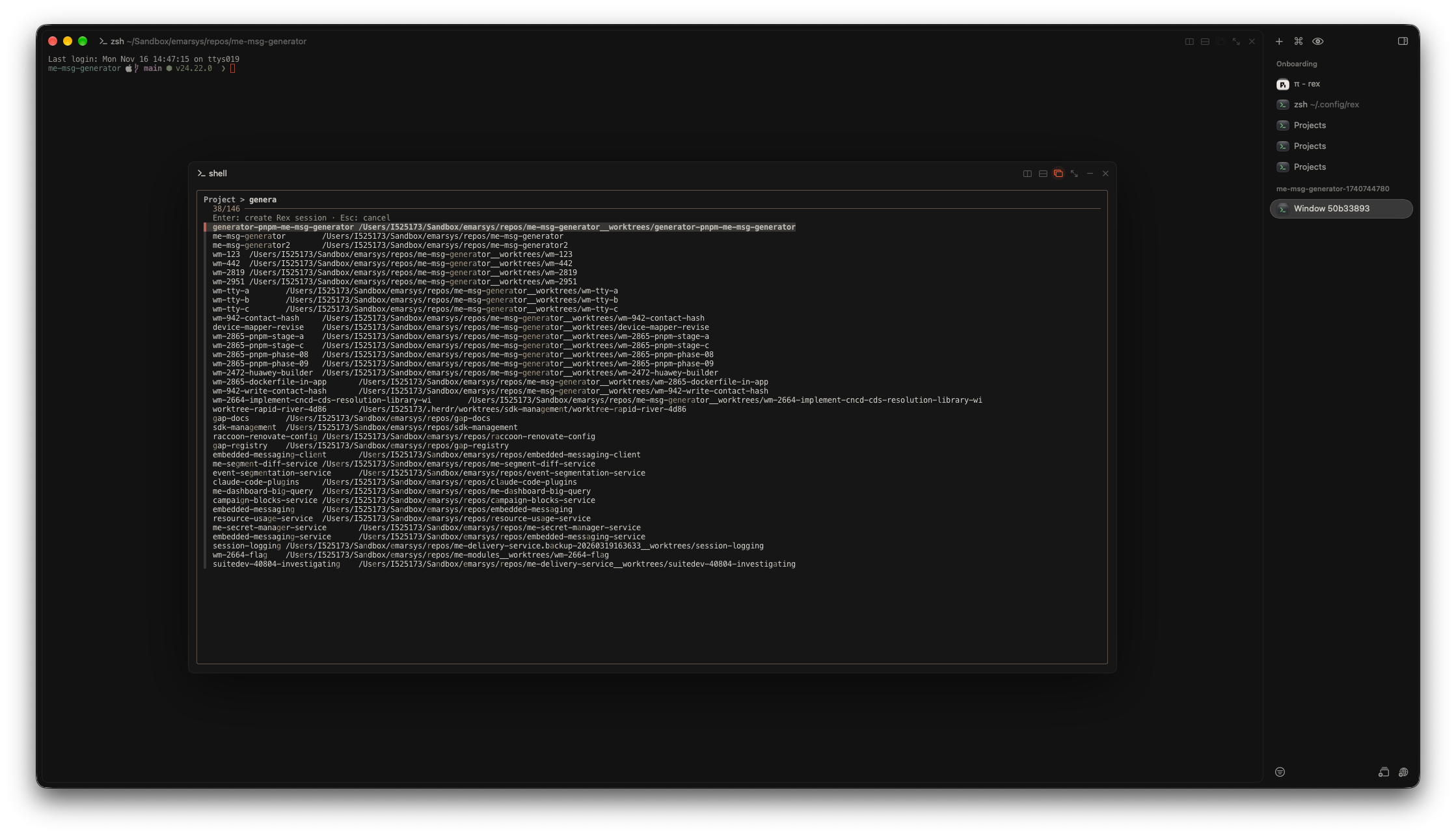
The finished picker. All I wanted was a folder list. The worktrees came too.
Open the picker: press Ctrl + A, release both keys, then press F (no Shift).
Type to filter folders. Use ↑ and ↓ to choose one. Press Enter to open its session, or Esc to cancel.
Get Rex
Start with the official Rex website for access and downloads. The installation guide covers platform availability and setup. Rex is currently in beta; this setup uses the macOS app.
Four requirements. Surely this will be quick.
The picker must do four things.
- List folders below my project roots.
- Include registered Git worktrees.
- Open as a popup over the current terminal.
- Create or reuse a Rex session, then show it automatically.
My project roots are:
~/projects~/Sandbox/work/repos~/Documents/ZkThe specific roots are personal. The pattern is portable. The number of unfinished projects is not relevant to this tutorial.
Why this is different from tmux
A tmux sessionizer can inspect a session’s current path and switch its own client directly. Rex has a different model.
- A session is a workspace with one or more windows and blocks.
- A window is a tab.
- A block is a terminal pane.
- Rex server commands create and inspect sessions.
- Rex.app client actions control the visible application interface.
That distinction matters for the final step. Creating a session is a server operation. Making Rex.app display it is a client operation.
I had asked for a folder list. I was now learning a client-server architecture. This is how a small configuration task becomes an afternoon.
List folders and worktrees
The shell script starts by scanning only the immediate children of each root. For every repository, it also asks Git for registered worktrees.
project_directories() {    local root directory record
    for root in "$HOME/projects" "$HOME/Sandbox/work/repos" "$HOME/Documents/Zk"; do        [[ -d "$root" ]] || continue
        while IFS= read -r -d '' directory; do            if [[ "$directory" == *__worktrees ]]; then                find "$directory" -mindepth 1 -maxdepth 1 -type d -print0                continue            fi
            printf '%s\0' "$directory"
            while IFS= read -r -d '' record; do                [[ "$record" == 'worktree '* ]] && printf '%s\0' "${record#worktree }"            done < <(git -C "$directory" worktree list --porcelain -z 2>/dev/null || true)        done < <(find "$root" -mindepth 1 -maxdepth 1 -type d -print0)    done}
The discovery step uses NUL-delimited paths, so spaces do not split a folder name into several arguments. The display rows later use tabs and newlines, so names containing those characters remain a limitation.
Some tools store worktrees in a sibling directory ending in __worktrees. That directory is a container, not a project. The script lists its children instead.
The resulting paths are canonicalized and deduplicated before they are displayed:
folder_rows() { while IFS= read -r directory; do printf '%s\t%s\n' "${directory##*/}" "$directory" done < <( while IFS= read -r -d '' directory; do canonical_path "$directory" || true done < <(project_directories) | LC_ALL=C sort -u )}Each row contains a display name and its full path. fzf displays both fields and returns the exact selected path.
Run fzf in a Rex floating layer
The early attempts included a split and a separate tab. Neither delivered the popup interaction I wanted.
We also confused tests inside an agent’s command runner with tests inside an interactive terminal. Those are not the same environment. A failed fzf test there does not prove that Rex splits lack a terminal.
The least useful experiment sent test text into my active pane. That demonstrated text delivery. It did not demonstrate good judgment.
The right primitive was already in Rex: a floating layer. It creates a terminal block above the current window. In other words, a popup. Exactly the thing I had asked for before the sightseeing tour.
The key binding is defined in ~/.config/rex/init.lua:
rex.action{ name = "project_picker", title = "Open Project Picker…", run = function(ctx, args) local result, err = rex.session.new_layer{ session_id = ctx.session_id, bounds = { 0.12, 0.15, 0.76, 0.70 }, focus = true, layout = rex.layout.block{ flavor = "com.superlogical.terminal.shell", options = { command = { "bash", os.getenv("HOME") .. "/.config/scripts/rex-project-picker", }, shell = "none", }, }, } if result == nil then error(err, 0) end end,}
rex.bind("ctrl+a>f", "project_picker")The four values in bounds are fractions of the current window:
x, y, width, heightThis example places the picker with a margin around it. Rex focuses the new layer, so keyboard input goes to fzf. After selection, the script handles the session switch and exits. Rex then closes the popup. Cancelling exits without creating a session.
I kept Ctrl+A, F because it preserves my tmux muscle memory. In my configuration, it leaves Rex’s Cmd+K session picker unchanged. My fingers accepted this compromise.
fzf is installed. The popup would like proof.
Rex starts the popup terminal without my interactive shell startup files. This is deliberate and prevents unrelated shell configuration from changing command execution.
It also means the popup may not have Homebrew’s bin directory in PATH. The first result was therefore not a folder list:
fzf: command not foundA minimalist interface, but missing a few features.
On my Mac, fzf is installed here:
/opt/homebrew/bin/fzfThe script uses that explicit path:
export PATH="/opt/homebrew/bin:/opt/homebrew/sbin:/usr/local/bin:$PATH"fzf_bin="/opt/homebrew/bin/fzf"
[[ -x "$fzf_bin" ]] || {    printf 'fzf was not found at %s\n' "$fzf_bin" >&2    exit 1}
choice=$(folder_rows | "$fzf_bin" \    --delimiter=$'\t' --with-nth=1,2 \    --layout=reverse --border --no-preview \    --prompt='Project > ' \    --header='Enter: create Rex session · Esc: cancel') || exit 0
If your fzf executable is elsewhere, change fzf_bin to its absolute path. Adding a directory to PATH will not change this explicit executable path.
Create a stable session name
Two unrelated projects can share a directory name. Reusing a session only by basename would open the wrong project in that case.
I derive the Rex session label from the basename plus a checksum of the full canonical path:
base=$(basename -- "$selected" | tr '.:' '__')checksum=$(printf '%s' "$selected" | cksum | awk '{print $1}')label="${base}-${checksum}"The result looks like this:
api-243857219Not beautiful. Neither is opening the wrong api repository.
The label stays stable for one path and distinguishes typical same-basename projects. A checksum is not a guarantee of uniqueness, though. This is a lightweight naming scheme, not an identity database. Renaming the session manually also prevents lookup by that generated label.
The script lists Rex sessions, reuses a matching label, or creates a session with the selected directory as its working directory:
created=$("$rex_bin" new "$label" -c "$selected" --json)session_id=$(printf '%s' "$created" | python3 -c 'import json,sys; print(json.load(sys.stdin)["session_id"])')rex new -c creates the session and starts its first terminal in the selected folder.
Switch Rex.app automatically
Creating a session does not automatically make Rex.app show it. That is a deliberate boundary in Rex.
The session existed. I just could not see it yet. Technically successful; emotionally incomplete.
Rex server commands can manage sessions. Client actions can control the visible app interface, such as selecting a session. Rex protects client actions behind Remote Control, which is disabled by default.
To enable automatic switching:
- Open Rex Settings.
- Open Rex Server.
- Enable Remote Control.
Then the script finds the connected Rex.app client and asks it to select the new or existing session:
client_id=$("$rex_bin" client ls -s "$REX_SESSION" --json | python3 -c "import json, sysfor client in json.load(sys.stdin).get('clients', []):    if client.get('info', {}).get('kind') == 'app':        print(client['client_id'])        break")
exec "$rex_bin" -C "$client_id" do session.select "session_id=$session_id"
This permission does not grant the picker access to folders. The script already runs with the permissions of the user who started it.
Remote Control permits client actions such as selecting a session. It is broader than a permission for this picker alone, so enable it only if you want scripts to control Rex.app.
The example chooses the first attached app client. That suits my single-app setup. With multiple app clients, pass the intended client explicitly.
The final flow
The complete interaction is now short:
Ctrl+A, F → floating fzf folder picker → select a project or worktree → create or reuse its Rex session → Rex.app opens that sessionCmd+K remains useful for navigating sessions that already exist. The custom binding solves a different problem: starting from a project folder rather than from a session name.
Use the built-in picker for sessions. Use the custom popup for projects.
I moved from tmux to Rex. My folder picker moved with me. My fingers still believe nothing has changed.
For once, everybody is happy with the migration.